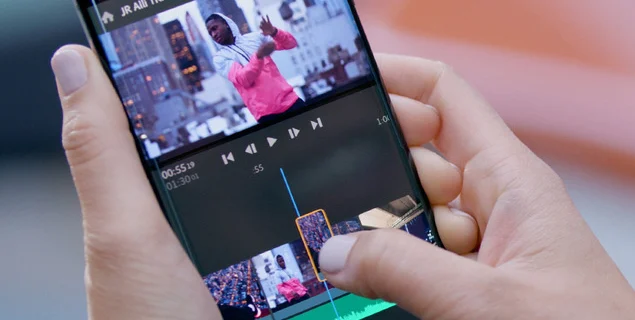
Edit videos on your phone: cut, add captions, and export without losing sharpness.
 Put Rodrigo Oliveira
Editing video on your phone is no longer improvised: you can cut, add subtitles, adjust color, and export a good result directly from your device. What differentiates a well-finished video from one that looks amateurish isn't the effects, but three basic decisions — the cut, the caption It is export. This guide covers all three and indicates the tools for each.
It also explains why the final file sometimes comes out more blurry than the original, a common problem with a simple solution.
Cut: where the editing really happens
Most of the work is deciding what to include. Start by removing the beginning and end of each take, where you see the hand adjusting the device and the pause before speaking. Then, cut out hesitations and repetitions. A well-edited three-minute video holds attention more than an eight-minute video with the same content.
Be careful with audio during edits: cutting mid-word or during a section with different background noise creates a noticeable jolt. Cut at natural pauses in speech and, when possible, let the sound smoothly transition through the image cut—a feature most editors offer as an audio transition.
Caption: the item that most changes the range
Most people watch videos without sound, and subtitles are no longer just an accessory. Modern editors generate automatic subtitles from speech, leaving the work to be done in proofreading: proper names, numbers, and technical terms are where recognition makes the most mistakes.
To ensure the caption is legible on mobile devices, use a simple font, a generous size, high contrast, and a maximum of two lines per caption. Position it above the area that social media buttons cover—the bottom of the screen is usually obscured.
Export: Why does the video lose sharpness?
This is the most frustrating aspect. When exporting, the editor recompresses the video, and the default settings don't always preserve the quality of the original material. Three parameters matter:
- Resolution: Export at the same resolution you recorded it in. Exporting 4K from 1080p footage adds no detail, it only increases the file size.
- Bitrate: This is what most affects sharpness. If the editor allows you to choose, prefer the highest value available; low rates create blur in scenes with movement.
- Frame rate: Keep the same value as the recording. Converting between different values produces irregular movement.
In addition to that, be mindful of the destination platform: social networks recompress what they receive. Sending a file that is already heavily compressed results in double loss. Export at the best quality and leave the recompression to the platform.
Apps that cover mobile work well
O InShot It's the most straightforward option for editing, captions, music, and social media formats. KineMaster It works with multiple layers and offers more control over audio and transitions. PowerDirector It has a timeline interface similar to that of computer programs, which will appeal to those who have already edited in one.
Before investing time in a project, consider two things: whether the free version adds a watermark to the export and which features require a subscription. It's worth testing by exporting a short clip before editing the entire video.
Music and images: be mindful of copyright.
Using a commercially available track in a published video often results in the video being blocked, the audio being removed, or the revenue being redirected to the rights holder, depending on the platform. The safest option is to use the licensed music libraries offered by the networks and publishers themselves, as well as collections of royalty-free tracks—always checking the specific license of each file.
The same reasoning applies to film clips, third-party images, and content downloaded from other accounts. And apps that claim to remove watermarks from other people's videos exist to circumvent attribution of authorship—using them is a copyright issue, and has nothing to do with editing your own material.
Before we begin: space and performance
Video editing requires free space for temporary project files, in addition to the original footage and the final file. Check it out at [link/reference]. Settings > Storage And free up space beforehand, so you don't lose a project halfway through. On devices with limited memory, close other applications, avoid very long projects, and export in parts whenever possible.
Pace: what determines whether a person watches until the end.
After mastering the mechanics of editing, the next leap in quality is in structure. Short videos thrive on rhythm, and rhythm is the distance between one new piece of information and the next. When that distance grows, the viewer leaves—and they leave mainly at the beginning.
Three decisions solve almost everything. The first is to get straight to the point: introductions, thank you notes, and explanations of what's to come consume the seconds you still had your attention. The second is to present one idea per segment, cutting off when the idea ends, not when the sentence ends. The third is to vary the framing or insert a supporting image when the same shot goes on for too long—the visual change reignites attention even when the audio remains the same.
A simple test will seal the deal: watch the entire clip, without pausing, with your finger ready to skip ahead. Every point where you felt the urge to fast-forward is a point that needs to be shortened.
The soundtrack cannot compete with the spoken word.
Common mistake in video audio: setting the music to the same level as the voice because it sounds good on headphones. On the phone's speaker, which is where most people watch, the speech gets lost.
- Adjust the music for the worst-case scenario. Check the volume on your device's speaker: if you can't understand every word, turn the music down.
- Use automatic downgrade., When the editor offers it, it automatically lowers the music volume during speech and restores it during pauses.
- Avoid music with narration. Two voices vying for the same space get tired in seconds.
- Normalize your voice before messing with the rest. Speech recorded on different days arrives at different volumes, and this is more noticeable to the ears than any special effect.
- Silence is also a resource. Cutting the track slightly before an important sentence works better than increasing its volume.
Color: the only thing worth changing
Color correction on a cell phone is effective when done subtly. Start with white: find something in the image that should be white or gray and adjust the temperature until it looks neutral. This corrects the greenish tint of fluorescent light and the orange tint of warm light bulbs, which are what make the video look amateurish.
Then, a touch of contrast and nothing more. Strong filters have two problems: they destroy skin tone and reveal the change with each cut, because two takes of the same scene responded differently to the same filter. If you used multiple takes, correct one at a time until they look similar to each other, and only then apply a general adjustment on top. And be careful with the screen: many cell phones display much more saturated color than reality, so the video that looks perfect on your device may appear exaggerated on someone else's.
Automated features and where they go wrong.
Current video editors offer silence detection cutting, green screen background removal, voice enhancement, and the ability to generate short clips from long videos. These are useful and save real time, provided you know where each one falls short.
Automatic silence editing confuses dramatic pauses with excess and often skips the beginning of words; review the edits. Background removal depends on contrast between person and wall, makes mistakes with hair, glasses, and thin objects, and is much worse in low light. Voice enhancement helps with constant noise, such as air conditioning, but does nothing for saturated sound. There's also a point that nobody mentions: some of these features are processed on a server, which means your material leaves the device, requires internet access, and is delayed depending on the queue. If the video contains sensitive content, prefer the locally played option.
How does a free publisher make money?
There's no such thing as a free editor out of kindness, and understanding the model avoids surprises at the end of the project. The most common is the subscription model, which unlocks features: cutting and subtitling are free, while high-resolution export, extra layers, library tracks, and some automations are available for a fee. Another model is the paid advertisement—you watch a video to unlock an export or a specific feature.
There's also the sale of content: ready-made templates, transition packages, fonts, and licensed music. And there's the indirect model, where the tool is free because it belongs to a platform interested in you publishing there—the cost, in this case, is convenience and usage data, not money. What deserves attention in all three is the short trial with automatic renewal, and the subscription that, when canceled, leaves you unable to export a project already completed.
Save the project before it's lost.
Project and exported video are different things, and confusing the two is like wasting work. The project is just a list of instructions that points to the original files; it doesn't contain the video. If you delete the raw footage from the gallery to free up space, the project opens empty, with missing segments.
- Keep the original material on your device until the video is published and reviewed.
- Export an intermediate version after completing each major step—cutting done, captions ready. If the project becomes corrupted, you lose a step, not everything.
- Save the final export file separately from your phone, along with the raw footage, if you intend to edit it later.
- Avoid updating the application in the middle of a large project, because version changes sometimes prevent you from opening previously saved files.
- Leave some extra storage space: interrupted exports due to lack of space often result in broken files.
Questions that arise later
I cut the video and the audio went out of sync. Why?
Usually because the file was recorded at a variable frame rate, common in screen recording and on some devices. The editor assumes a fixed value, and the discrepancy increases over time. Converting to a fixed frame rate before importing solves the problem.
My vertical video has black bars on the sides. What did I do wrong?
The project's aspect ratio was created in landscape format. It needs to be defined at the beginning, before importing the material—changing it later forces the editor to fit the image, creating the bars.
Can I edit a video that I've already published and then download it back?
You can, but the downloaded copy has already been recompressed by the platform, and a second pass will noticeably worsen the result. Always edit from the original saved file.
The subtitles disappear on some devices. How can I prevent this?
This happens when the subtitles are in a separate file, which not all players display. For videos posted on social media, prefer subtitles embedded in the image, which appear anywhere and don't depend on the viewer's settings.
Why does exporting take so long?
Because the device needs to recalculate each frame with all the applied effects. Duration, resolution, and number of layers affect the time it takes. Leave your phone charging, even when not in use, and avoid exporting when the battery is low—interruptions in the middle usually require redoing everything.
Frequently Asked Questions
Why does my video become blurry after I publish it?
Because the platform recompresses the uploaded file. If it was already heavily compressed, the loss is compounded. Export at the highest quality your editor allows and avoid converting the same video multiple times before publishing.
Does editing on a mobile phone have the same quality as editing on a computer?
For short videos and simple projects, yes, and with much more speed. The computer has an advantage in long projects, with many layers, detailed color correction and time-consuming exports, in addition to offering a larger screen for precision work.
Does the free version add a watermark?
It depends on the application and changes over time. Some only display a mark when you use certain features. The test that resolves the doubt is to export ten seconds before starting the actual project.
How can I improve the audio of a video that has already been recorded?
It's possible to reduce background noise, equalize the voice, and normalize the volume, with real but limited gain. Saturated sound, with pops, cannot be fixed. Therefore, it's worth checking the audio in a test take before recording for real.
Which output format should I choose?
For general use, the standard format offered by publishers is compatible with virtually everything. What deserves attention is not the format itself, but rather the resolution, frame rate, and bitrate, which define the file size and sharpness.
Conclusion
Cut carefully, add subtitles with the viewer in mind (without sound), and export at the highest resolution and bitrate available. These three decisions account for most of the difference in final quality—far more so than transitions and effects. And remember that the final file is never better than the recorded material: light and sound are still defined at the moment of capture.
Read too
- Edit photos on your phone: the light and color adjustments that change the image.
- Apps for creating music on your phone: record, mix, and export your track.
- Recovering Videos from Your Cell Phone: Where to Look Before Installing Anything
- Deleted Photos from Your Phone: How to Recover Them and How to Never Lose Them Again
- System cleanup: how to remove photos and videos from your phone without losing anything
- Recovering Photos and Videos: Why Video Is Much More Difficult