Apps for creating music on your phone: record, mix, and export your track.
 Put Rodrigo Oliveira
Producing music on a cell phone is feasible, and the path is shorter than it seems—but it has three stages that are often treated as one: to record, mix It is export. Each one requires different things from the app and the environment. This guide explains what happens at each stage, what you can do with the device alone, and where it's worth investing in an inexpensive accessory.
No studio in your pocket: your cell phone handles composition, sketching, and a good part of the production, but it has clear limitations that are best known beforehand.
Recording: what your cell phone microphone can do
The built-in microphone works well for recording ideas, recording vocals in quiet environments, and capturing guitar sound reasonably well. It doesn't handle high volumes well—drums and amplifiers can cause noise overload—nor does it work well in echoey environments.
Three measures greatly improve recording quality at no cost: record in a room with fabrics, a sofa, and curtains, which absorb reflection; maintain a constant distance from the microphone; and do a short test beforehand, listening with headphones. If the sound is already distorted in the recording, no subsequent adjustments will recover it.
To take it a step further, a compact audio interface with a USB connection allows you to connect a microphone and instrument with significantly higher quality. It's the best investment for anyone who frequently records vocals or acoustic instruments.
Composing and producing: the tools
O BandLab It's the most accessible entry point: free, with multi-track recording, virtual instruments, a library of backing tracks and projects saved in the cloud, making it easy to continue on another device or collaborate with someone else.
O FL Studio Mobile It's a complete production workstation, with a pattern sequencer, synthesizers, and effects — familiar to those who already use the computer version. Cubasis 3 It follows the timeline logic of professional programs, with detailed mixing. The last two are paid programs, and it's worth checking the price and what's included in the store before buying.
A practical note: music production apps are resource-intensive. On phones with limited memory, projects with many tracks will freeze and the audio will start to glitch. Close other apps, work with fewer simultaneous tracks, and export already completed parts to reduce the load.
A script for the first track.
If you've never produced anything before, start small and finish something. Choose a drum track from the app's library and set the tempo. Record a bass line or a simple chord over it, even if played on the on-screen keyboard. Add the melody or vocals last, once the structure is already in place.
Work in blocks of eight measures and repeat them to build the structure of the music. Almost every app allows you to copy and paste sections onto the timeline, which saves time and keeps the timing aligned. Don't try to get everything right in one session: save the project and listen to it the next day, with fresh ears—it's amazing what you notice on that second listen.
Once the track is ready, export a version and listen to it in three different places: headphones, your phone's speaker, and a speaker system. Note what bothers you in each one and go back to the project to adjust it. Two or three rounds of this cycle improve the result more than any new effect.
Mixing: what really matters
- Relative volume between the bands This resolves most of the mixing issues. Before applying any effects, balance the levels.
- Equalization to create space: Instead of increasing everything, reduce the frequency range of one instrument where another needs to be highlighted.
- Compression with moderation: It evens out the peaks and adds consistency, but in excess it leaves the sound breathless.
- Reverberation in small doses: Too much reverb pushes out the vocals and muddies the mix.
- Listen in various places: Headphones, cell phone speaker, and speaker system. A mix that works on all three is on the right track.
An honest word of caution regarding monitoring: cell phone speakers don't reproduce bass, so it's easy to overdo it in that range without realizing it. Regular headphones already improve the sound significantly.
Export: close the file without losing quality.
Export at the highest quality offered by the application and save this file as the main version. From there, generate compressed versions to send via chat or publish. Doing the opposite—compressing and then recompressing—adds losses at each step.
Leave a small margin of volume in the final file, instead of pushing it to the limit: streaming platforms adjust the volume of tracks on their own, and saturated material sounds worse after this processing.
Rights: the point that often gets overlooked.
The instrumental tracks and samples included in streaming apps come with a usage license, and it varies: some allow commercial use, others do not. Before publishing a track on streaming platforms, read the terms of the library you used. Similarly, using excerpts from commercial recordings without authorization will result in blocking or removal, and the fact that the track has been modified does not change that.
Latency: why does the sound arrive after the finger?
Anyone who starts producing music on their phone will soon encounter this problem: you touch the screen and the sound comes out an instant later. This isn't a problem with the app. Between the touch and the speaker there's a processing queue, and the system stores a small piece of audio before delivering it to the output. The larger this piece, the more stable the audio and the greater the delay; the smaller it is, the more responsive and the greater the risk of popping.
In practice, three things reduce the annoyance. The first is to use wired headphones, because wireless transmission adds its own delay to the problem. The second is to look in the app's audio preferences for adjusting the buffer size and lowering it until the sound is still clean. The third is to accept what can't be overcome: when the delay is too disruptive, record the part by drawing the notes on the grid instead of playing, and use a metronome as a reference.
Sampling rate, bits, and project weight
Digital audio is measured in two ways. The sampling rate indicates how many times per second the sound is measured, and the bit depth indicates how precisely each measurement is recorded. Higher numbers capture more detail and take up more space—which is where many people get scared as the project grows.
To give you an idea of the scale: one minute of uncompressed stereo audio, at CD quality, takes up around ten megabytes. Multiply that by each track and each attempt you didn't delete, and a five-minute project with eight tracks easily exceeds one gigabyte. Two measures solve this: delete discarded takes instead of leaving them muted on the timeline, and transfer completed projects off the device. Working with nearly full storage is one of the most common causes of freezing during recording.
Connect keyboard, microphone, and interface to your mobile phone.
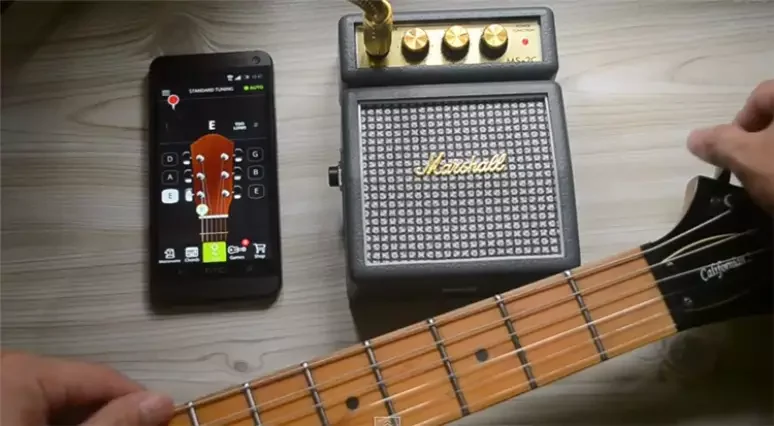
The phone accepts more devices than it seems, as long as they follow the standard that the system already understands without needing to install drivers. Some practical points:
- The right adapter. Devices without a headphone jack require an adapter for the data port; those that offer a peripheral connection function allow you to connect a keyboard and interface directly.
- Food. Devices that draw power from a phone's port drain the battery quickly. An adapter with a power input solves both problems at the same time.
- Compatibility. Not all devices are recognized. Before buying, check if the model works without additional software.
- A keyboard that only sends commands. A controller doesn't produce sound on its own: it sends the note information, and the virtual instrument in the application generates the sound.
- One thing at a time. Connecting the interface, keyboard, and charger simultaneously to an entry-level device often leads to instability.
How do these apps make money?
It's important to know where the money comes from, because that explains what you'll find along the way. Free cloud-based libraries are supported by subscriptions: the basics are free, and features like unlimited tracks, advanced effects, and high-quality export are paid services. Saving your project on the server is convenient and is also what ties you to the service.
Another model is the one-time purchase of the app with in-app content sales: sound packs, instrument banks, and additional effects. A third is the sample store, where the tool is the bait and revenue comes from the libraries. None of these are traps, but two points deserve attention: the subscription that starts as a short trial and renews automatically, and the fact that distribution to streaming platforms is a separate service, charged by the distributor—it's not included in any production app.
What your cell phone can't solve
Knowing your limits prevents you from wasting time trying the impossible:
- It doesn't fix bad acoustics. If the room has an echo, it gets into the recording and doesn't come out afterwards.
- It doesn't separate instruments from a finished mixture without leaving a mark. The tools that attempt this estimate what each part was, and the result often has audible artifacts.
- It doesn't transform insecure execution into performance. Pitch correction and time alignment help with minor deviations; overuse produces an artificial sound.
- It can't handle a large project. Many tracks with real-time effects run into memory and processor limitations on the device.
- This does not replace listening references. Without decent headphones, you're mixing blindly in the bass range.
Questions that arise later
Can I continue a project on my computer that I started on my phone?
Yes, but rarely by opening the same project file. The reliable way is to export each track separately, from the beginning of the song, all with the same sample rate. This way they align themselves when imported from the other side.
How do I back up my work?
Keep three things: the project file, the exported separate tracks, and the final mix. The project alone depends on the application remaining installed and on the same version, and that's precisely what's often missing when you return to the material months later.
The app closes unexpectedly during recording. What should I do?
It's almost always a memory issue or heat. Close the rest of the screen, activate airplane mode to avoid interruptions, remove the case if the device gets hot, and record in short bursts. Reducing real-time effects during recording also helps a lot.
Is it worth recording vocals in a tiled room to gain reverberation?
No. Reverb recorded along with the vocals doesn't come through anymore, and it disappears into the mix like noise. Record as dry as possible and add the effect later, in controlled amounts.
Do I really need to use a metronome?
If you intend to copy sections, assemble a structure in blocks, or combine tracks recorded on different days, then yes. Without a fixed tempo reference, nothing fits together, and each edit becomes manual work.
Frequently Asked Questions
Is it possible to release a track produced on a cell phone on streaming platforms?
Technically, yes: the platforms accept files that meet the format and quality requirements, and distribution is handled by specialized services. The limiting factor is usually the quality of the recording and mixing, not the equipment used to assemble the project.
Why does the audio cut out or crackle during recording?
Usually, the device can't handle the real-time processing. Reduce the number of active tracks, disable effects during recording, and close other applications. On phones with limited memory, exporting already completed segments and re-importing them as a single track helps a lot.
Do I need a keyboard or a controller?
It's not mandatory, because the apps already have on-screen keyboards and grids. A USB-connected controller makes playing more natural and speeds up recording parts played, but it's a convenience, not a requirement.
Wired or wireless headphones for monitoring?
Wired. Wireless headphones introduce a delay between what you play and what you hear, which interferes with recording. For listening to the finished mix, any type of headphone will do; for recording, a wired connection avoids this discrepancy.
Is the paid app worth it?
This tool is useful for those who already master the basics but encounter limitations in track types, effects, or exporting. To begin, a free tool teaches the same concepts—volume, equalization, compression—that truly define the final result.
Conclusion
Start with BandLab, which is free and covers basic recording and production. Pay attention to the recording environment, balance the volumes before applying effects, and export in the best possible quality. Headphones and a simple interface will improve the result more than switching apps. And check the backing track licenses before publishing—this detail will prevent problems later.
Read too
- Edit photos on your phone: the light and color adjustments that change the image.
- Edit videos on your phone: cut, add captions, and export without losing sharpness.
- Listen to Catholic Music on Your Cell Phone: Legal Apps and How to Download Them
- Listening to Music on Your Cell Phone: The 5 Best Apps and Their Plans
- Photo editing apps: what are presets, RAW files, and the limitations of your phone?
- Photo editing app: which one to choose for each type of adjustment